By Mike Lewis
In a recent Hex Central article, Lynn Evans recommended using the SCOPE_IDENTITY() function to find the primary key of the most recently inserted row in a SQL Server table. That function is a better choice than @@IDENTITY or IDENT_CURRENT(), because it is specific to the session and the scope.
As a Visual FoxPro developer, I often use SCOPE_IDENTITY() when inserting records via SQL Pass-Through (SPT). But I recently found that it doesn't work with remote views. Specifically, if you use a view to insert a row, then use SQLEXEC() to send a call to SCOPE_IDENTITY(), you always get back a NULL - even if the SPT call uses the same connection handle as the view. That's because the two operations occur in different scopes.

January 2, 2013

December 31, 2012
A new resource for FoxPro developers, courtesy of Doug Hennig
By Mike Lewis
Doug Hennig is a FoxPro developer, and a prolific author and conference speaker. Over the last 16 years, he has written over a hundred articles for FoxTalk, FoxPro Advisor, CoDe, and other VFP-related journals. He has also published many white papers, based on presentations he's given at FoxPro DevCon, South West Fox, and similar events.
Now, for the first time, most of Doug's writings are available on line, all in one place. He has collected together 146 of his articles and papers, and published them on his personal website. Together, they make a valuable resource for VFP developers.
The subject matter ranges from class design to custom dialogs, archiving to anchoring, encryption to Intellisense. They are listed on the site in alphabetical order, and most come with sample code.
It's true that many of the articles are quite old. But, for the most part, the content is still relevant. (On that point, I wish the dates of the articles were shown so that we could have an idea of just how old they are, but that's a minor quibble.)
My thanks to Doug for providing us with this useful resource. I hope that he will continue to publish his work in this way in the years ahead.
Doug Hennig is a FoxPro developer, and a prolific author and conference speaker. Over the last 16 years, he has written over a hundred articles for FoxTalk, FoxPro Advisor, CoDe, and other VFP-related journals. He has also published many white papers, based on presentations he's given at FoxPro DevCon, South West Fox, and similar events.
Now, for the first time, most of Doug's writings are available on line, all in one place. He has collected together 146 of his articles and papers, and published them on his personal website. Together, they make a valuable resource for VFP developers.
The subject matter ranges from class design to custom dialogs, archiving to anchoring, encryption to Intellisense. They are listed on the site in alphabetical order, and most come with sample code.
It's true that many of the articles are quite old. But, for the most part, the content is still relevant. (On that point, I wish the dates of the articles were shown so that we could have an idea of just how old they are, but that's a minor quibble.)
My thanks to Doug for providing us with this useful resource. I hope that he will continue to publish his work in this way in the years ahead.
December 20, 2012
Use Dropbox to host icons for My Places maps
By Donald Ritchie
In my tutorial on adding custom icons to My Places in Google Maps, I mentioned that you can't use Dropbox to host your icons. That's because it requires a log-in. Hex Central reader Jamie Barber wrote to say that you can indeed use Dropbox for this purpose, provided you place the relevant files in your Public Folder. I have amended the article accordingly.
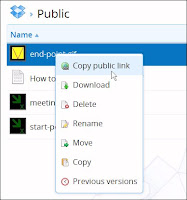 Once you've uploaded your icon file to your Public Folder in Dropbox, all you have to do is right-click on the filename, and select Copy Public Link (see screen shot). The file's URL will appear in a pop-up box, from where you can copy it to the clipboard. If you prefer a shorter - but more cryptic - version of the URL, click on "Shorten link".
You can then go ahead and paste the link into the Placemark Editor, as I described in the article.
There's one other update to the article. When I first wrote it, custom icons didn't show up properly in printed versions of a My Places map. Google has now fixed this problem. Now, when you print your map, all the icons will appear as expected.
In my tutorial on adding custom icons to My Places in Google Maps, I mentioned that you can't use Dropbox to host your icons. That's because it requires a log-in. Hex Central reader Jamie Barber wrote to say that you can indeed use Dropbox for this purpose, provided you place the relevant files in your Public Folder. I have amended the article accordingly.
 Once you've uploaded your icon file to your Public Folder in Dropbox, all you have to do is right-click on the filename, and select Copy Public Link (see screen shot). The file's URL will appear in a pop-up box, from where you can copy it to the clipboard. If you prefer a shorter - but more cryptic - version of the URL, click on "Shorten link".
You can then go ahead and paste the link into the Placemark Editor, as I described in the article.
There's one other update to the article. When I first wrote it, custom icons didn't show up properly in printed versions of a My Places map. Google has now fixed this problem. Now, when you print your map, all the icons will appear as expected.
October 9, 2012
French IGN 1:25,000 now available for Anquet Maps
By Mike Lewis
 In my article on transferring data from Anquet Maps to Google Maps, I mentioned that Anquet only supplies maps for the UK. The company had told me that mapping would be available soon for other countries, but they didn't put a date on that.
I'm happy to report that Anquet have now introduced a set of 1:25,000 topographical maps covering the whole of France (including Corsica). This is the highly-regarded Série Bleue of the Institut Géographique National (IGN). If you've ever used any of these maps, you'll know what superb quality they are. Like their British OS Explorer equivalents, they show a vast amount of detail, and are an excellent resource for hill-walking, cycling and most other outdoor activities.
And, of course, it's possible to use Anquet software to plot a route on these maps, then transfer it to Google's My Places, in the way I described in my article. More information about Anquet's products can be found on the company's website.
 In my article on transferring data from Anquet Maps to Google Maps, I mentioned that Anquet only supplies maps for the UK. The company had told me that mapping would be available soon for other countries, but they didn't put a date on that.
I'm happy to report that Anquet have now introduced a set of 1:25,000 topographical maps covering the whole of France (including Corsica). This is the highly-regarded Série Bleue of the Institut Géographique National (IGN). If you've ever used any of these maps, you'll know what superb quality they are. Like their British OS Explorer equivalents, they show a vast amount of detail, and are an excellent resource for hill-walking, cycling and most other outdoor activities.
And, of course, it's possible to use Anquet software to plot a route on these maps, then transfer it to Google's My Places, in the way I described in my article. More information about Anquet's products can be found on the company's website.
September 6, 2012
Bold, italic, em and strong. Understanding the difference between these HTML tags
By Donald Ritchie
If you write HTML code, you're almost certainly familiar with the b and i tags, and probably the em and strong tags too. Between them, these tags are used to add emphasis or "strength" to your text in various ways. But do you know the differences between them? And which one you should use in a given situation?
The correct use of these tags can be confusing. Let's look at each of them in turn.
If you write HTML code, you're almost certainly familiar with the b and i tags, and probably the em and strong tags too. Between them, these tags are used to add emphasis or "strength" to your text in various ways. But do you know the differences between them? And which one you should use in a given situation?
The correct use of these tags can be confusing. Let's look at each of them in turn.
August 31, 2012
Hiding the icon in a Visual FoxPro form
By Mike Lewis
A colleague recently asked if it was possible to hide the icon in a VFP form. She was referring to the icon at the left end of the title bar - the one you click to reveal the control menu.
A colleague recently asked if it was possible to hide the icon in a VFP form. She was referring to the icon at the left end of the title bar - the one you click to reveal the control menu.
July 24, 2012
Recover the Google Toolbar in Firefox
By Lynn Evans
When I recently upgraded my Firefox browser, I was dismayed to discover that my favorite add-on, the Google Toolbar, no longer worked. It seems that Google has withdrawn all support for the product, which now only functions in Firefox 4.x and below.
This was a minor disaster for me. The Google Toolbar is something I use constantly, every working day. It's true that some of its features are now built into Firefox itself. Others can be obtained from other add-ons. I've tried a few of these, but none of them could compare to the sheer convenience of the original product. Several weeks after upgrading, I was still finding the Google Toolbar hard to live without.
When I recently upgraded my Firefox browser, I was dismayed to discover that my favorite add-on, the Google Toolbar, no longer worked. It seems that Google has withdrawn all support for the product, which now only functions in Firefox 4.x and below.
This was a minor disaster for me. The Google Toolbar is something I use constantly, every working day. It's true that some of its features are now built into Firefox itself. Others can be obtained from other add-ons. I've tried a few of these, but none of them could compare to the sheer convenience of the original product. Several weeks after upgrading, I was still finding the Google Toolbar hard to live without.
Subscribe to:
Posts (Atom)