By Mike Lewis
In my article on calculating distances between UK postcodes, I posted a link to a site named EasyPeasy from where you can download a file containing the grid references of outward postcodes. Several HexCentral readers have recently contacted me to tell me that the link is now dead and the site no longer available.
I have now updated the article to include a new link. This one is to a site hosted by Dan Gibbs, which includes an up-to-date version of the outward postcode file. This version of the file is superior to the one formerly provided by EasyPeasy, as it also includes latitudes and longitudes, and the names of towns and counties (or their equivalents). The site warns that the town names are not completely accurate, but that won't matter for the distance calculations, as these only need the outward postcodes and the grid references.
My thanks to Dan Gibbs for providing this useful resource (free of charge), and to Adrian Bordicott for pointing it out to me.

June 16, 2016

November 28, 2014
Why respond.min.js didn't work (and how I fixed it)
By Mike Lewis
I recently spent a frustrating half hour trying to get respond.min.js to work. I knew there was nothing wrong with the script: I've successfully used it several times before. But this time it just wouldn't play. I eventually found the solution – and kicked myself. For the benefit of anyone else having the same problem, here's the story.
I recently spent a frustrating half hour trying to get respond.min.js to work. I knew there was nothing wrong with the script: I've successfully used it several times before. But this time it just wouldn't play. I eventually found the solution – and kicked myself. For the benefit of anyone else having the same problem, here's the story.
September 10, 2014
Using Google Classic Maps with the Android My Tracks app
By Mike Lewis
Until recently, I used Google's My Tracks application to track my hikes and bike rides, and to share these via My Places in Google Maps. This worked perfectly for over a year. Unfortunately, Google then decided to drop the app's support for Google Maps. Overnight, the app became much less useful – to the extent that I almost gave up using it. In this blog post, I'll explain the problem in a little more detail, and tell you how I solved it.
In a nutshell, My Tracks is an Android app that uses your phone or tablet's GPS receiver to trace a journey: a drive, hike, bike ride, or whatever. Once you have completed the route, you can choose to save or export it in a variety of ways (Figure 1). One of the options was to export it to Google Maps. This was trivially easy to do. You just chose a single menu option, and a few moments later your route appeared on the map. Perfect.
In the latest version, you can still export the map, but it now goes to the new Google Maps Engine. Despite the similarity in name, this is not the same as Google Maps (which is now called Classic Maps). The new tool has several advantages over the classic version, but there are a number of reasons that I – and many other people – prefer not to use it.
 |
| Figure 1 |
In a nutshell, My Tracks is an Android app that uses your phone or tablet's GPS receiver to trace a journey: a drive, hike, bike ride, or whatever. Once you have completed the route, you can choose to save or export it in a variety of ways (Figure 1). One of the options was to export it to Google Maps. This was trivially easy to do. You just chose a single menu option, and a few moments later your route appeared on the map. Perfect.
In the latest version, you can still export the map, but it now goes to the new Google Maps Engine. Despite the similarity in name, this is not the same as Google Maps (which is now called Classic Maps). The new tool has several advantages over the classic version, but there are a number of reasons that I – and many other people – prefer not to use it.
August 21, 2014
How to remove 'Permanently shred with AVG' from your context menu
By Mike Lewis
 If you have recently installed – or upgraded to – AVG 2014, you might have noticed a new item on context menus in Windows Explorer. The item reads 'Permanently shred with AVG', and it does what its name suggests: It completely destroys the file or folder you are pointing to, without any chance of recovery.
Now, it could be that you will find this feature useful. If you want to place some confidential information beyond the reach of the Recycle Bin or a file recovery tool, this is a good way of doing it. But if, like me, you are worried about accidentally shredding an important file, you might prefer to remove this menu option. Here's how to go about it.

Now, it could be that you will find this feature useful. If you want to place some confidential information beyond the reach of the Recycle Bin or a file recovery tool, this is a good way of doing it. But if, like me, you are worried about accidentally shredding an important file, you might prefer to remove this menu option. Here's how to go about it.
August 8, 2014
How to stop the Samsung Galaxy from vibrating
By Mike Lewis
One of the things I dislike about my new Samsung Galaxy tablet is the way it vibrates at every opportunity – whether I want it to or not. It does this when I switch the device on, press the Home button, press and hold the Power button, and at several other times too.
This is irritating, not least because it’s unnecessary. I could understand it if the vibrations alerted me to an important event, such as an incoming message. But there is no reason to have this kind of haptic feedback every time I press certain buttons. (It’s also adds to the drain on the battery.)
One of the things I dislike about my new Samsung Galaxy tablet is the way it vibrates at every opportunity – whether I want it to or not. It does this when I switch the device on, press the Home button, press and hold the Power button, and at several other times too.
This is irritating, not least because it’s unnecessary. I could understand it if the vibrations alerted me to an important event, such as an incoming message. But there is no reason to have this kind of haptic feedback every time I press certain buttons. (It’s also adds to the drain on the battery.)
July 25, 2014
Google's disavow tool revisited
By Lynn Evans
About a year ago, I submitted some suspicious links to Google’s disavow tool – against the strident advice of several friends and colleagues. Almost everyone I spoke to warned me against doing this. But I went ahead anyway – with a surprising result.
The usual argument against using the disavow tool is that it draws attention to dodgy links that you might have planted yourself – and therefore risks a penalty. I never understood that. If Google thinks the links are spammy, it will ignore them or penalize you in any case. The disavow tool is your chance to tell the search engine that you are not responsible for the links. Another reason not to use it is that you might inadvertently remove reputable links that are helping your rankings. That sounds more plausible to me.
In my case, the site had attracted several thousand links over the years. But about 900 of these were coming from what was clearly a link farm. I don’t know how or why they got there – it was certainly none of my doing. It was these links that I wanted to disavow.
About a year ago, I submitted some suspicious links to Google’s disavow tool – against the strident advice of several friends and colleagues. Almost everyone I spoke to warned me against doing this. But I went ahead anyway – with a surprising result.
The usual argument against using the disavow tool is that it draws attention to dodgy links that you might have planted yourself – and therefore risks a penalty. I never understood that. If Google thinks the links are spammy, it will ignore them or penalize you in any case. The disavow tool is your chance to tell the search engine that you are not responsible for the links. Another reason not to use it is that you might inadvertently remove reputable links that are helping your rankings. That sounds more plausible to me.
In my case, the site had attracted several thousand links over the years. But about 900 of these were coming from what was clearly a link farm. I don’t know how or why they got there – it was certainly none of my doing. It was these links that I wanted to disavow.
Speeding up postcode queries
By John Hyde
In an article on Hex Central, Mike Lewis showed how to calculate the distance between any two British postcodes. Here’s a tip for speeding up the process.
The calculation that Mike demonstrated is a simple application of Pythagoras’ theorem. You start by getting the grid references (that is, the x, y co-ordinates) of the two postcodes. Next, add the sums of the squares of the x and y distances between them. Finally, take the square root of the value thus obtained. That final figure is the straight line distance between the two points.
My tip is simply to omit the calculation of the square root. So, instead of working with the actual distance, you work with the square of that distance.
As an example, let’s suppose you want to sort a series of postcode pairs into descending order of distance apart. You omit the calculation of the square root, which means that you will in fact be sorting by the square of the distance apart. The result will still be correct.
Similarly, if you want to find all postcodes within a given radius of a fixed point, you omit the square root calculation, and compare the distances with the square of the target radius. Again, this will give the correct result.
Since the calculation of the square root is likely to be the most time-consuming part of the process, leaving it out should speed things up considerably.
In an article on Hex Central, Mike Lewis showed how to calculate the distance between any two British postcodes. Here’s a tip for speeding up the process.
The calculation that Mike demonstrated is a simple application of Pythagoras’ theorem. You start by getting the grid references (that is, the x, y co-ordinates) of the two postcodes. Next, add the sums of the squares of the x and y distances between them. Finally, take the square root of the value thus obtained. That final figure is the straight line distance between the two points.
My tip is simply to omit the calculation of the square root. So, instead of working with the actual distance, you work with the square of that distance.
As an example, let’s suppose you want to sort a series of postcode pairs into descending order of distance apart. You omit the calculation of the square root, which means that you will in fact be sorting by the square of the distance apart. The result will still be correct.
Similarly, if you want to find all postcodes within a given radius of a fixed point, you omit the square root calculation, and compare the distances with the square of the target radius. Again, this will give the correct result.
Since the calculation of the square root is likely to be the most time-consuming part of the process, leaving it out should speed things up considerably.
May 30, 2013
New tracks not appearing in the iTunes music library
By Mike Lewis
For several years, I've been happily using iTunes to organize my music collection and transfer tracks to my iPod. Then, quite suddenly, it stopped working. More specifically, I found I could no longer add new tracks to my music library. There was no error message, no unusual behavior. The newly-added tracks were simply nowhere in sight.
I eventually found a solution, but only after much searching and experimenting. I'll summarize the steps here, for the benefit of any Hex Central readers who face the same issue.
For several years, I've been happily using iTunes to organize my music collection and transfer tracks to my iPod. Then, quite suddenly, it stopped working. More specifically, I found I could no longer add new tracks to my music library. There was no error message, no unusual behavior. The newly-added tracks were simply nowhere in sight.
I eventually found a solution, but only after much searching and experimenting. I'll summarize the steps here, for the benefit of any Hex Central readers who face the same issue.
May 24, 2013
FileSystemObject performance issues
By Mike Lewis
In a recent Hex Central article, I explained how you can use the FileSystemObject to read and write large text files in Visual FoxPro. One of the main reasons for doing that is to work with files that would otherwise break VFP's 2 GB limit.
Unfortunately, that benefit comes at a price. In many cases, the FileSystemObject will be a lot slower than using native VFP commands and functions.
In a recent Hex Central article, I explained how you can use the FileSystemObject to read and write large text files in Visual FoxPro. One of the main reasons for doing that is to work with files that would otherwise break VFP's 2 GB limit.
Unfortunately, that benefit comes at a price. In many cases, the FileSystemObject will be a lot slower than using native VFP commands and functions.
May 8, 2013
Welcome improvements to AdSense reports
By Donald Ritchie
Google have just made some small - but very welcome - improvements to their AdSense reports. They've made it easier for you to spot medium- and long-term trends in your AdSense data. They've introduced a number of useful new graph types. And they now let you see at a glance the effect of any changes you make to your AdSense setup, such as introducing a new ad unit, or blocking a sensitive category.
Google have just made some small - but very welcome - improvements to their AdSense reports. They've made it easier for you to spot medium- and long-term trends in your AdSense data. They've introduced a number of useful new graph types. And they now let you see at a glance the effect of any changes you make to your AdSense setup, such as introducing a new ad unit, or blocking a sensitive category.
April 10, 2013
How to give focus to a FoxPro top-level form at start-up
By Mike Lewis
This is a question I often see in Visual FoxPro forums. An application needs to show a top-level form (typically a log-in screen) at start-up. But when you launch the form, it
appears behind other windows on the desktop. Even if it is at the front, it's not necessarily the active form. So how do you give the form focus programmatically?
This is a question I often see in Visual FoxPro forums. An application needs to show a top-level form (typically a log-in screen) at start-up. But when you launch the form, it
appears behind other windows on the desktop. Even if it is at the front, it's not necessarily the active form. So how do you give the form focus programmatically?
April 8, 2013
Strong passwords? Yes, but let's not get carried away
By Lynn Evans
I'm getting a bit tired of over-the-top advice about strong passwords. Of course, we all need to keep our passwords secure. But a lot of what tech journals and websites write about the subject is exaggerated and alarmist - and often counter-productive.
I'm getting a bit tired of over-the-top advice about strong passwords. Of course, we all need to keep our passwords secure. But a lot of what tech journals and websites write about the subject is exaggerated and alarmist - and often counter-productive.
April 3, 2013
Banish interest-based ads from your AdSense pages
By Mike Lewis
 In an earlier post, I explained how you can opt out of seeing so-called "interest-based ads" on Google's search results pages and on third-party websites. This time, I'll describe how AdSense publishers can prevent these ads appearing on their own sites.
To recap, an interest-based ad is one that's based on the personal information that the advertising network (usually Google) has collected on you. Some people dislike being tracked and targeted for advertising purposes. There might also be times when these ads could cause distress or embarrassment (seeing an ad about a medical condition that you'd rather keep to yourself, for example). That's why you have the opportunity to opt out.

To recap, an interest-based ad is one that's based on the personal information that the advertising network (usually Google) has collected on you. Some people dislike being tracked and targeted for advertising purposes. There might also be times when these ads could cause distress or embarrassment (seeing an ad about a medical condition that you'd rather keep to yourself, for example). That's why you have the opportunity to opt out.
March 29, 2013
Opt out of Google's interest-based ads
By Mike Lewis
 Imagine this scenario. It's your lunch break, and you start thinking about your next vacation. Out of idle curiosity, you use Google to search for accommodation on your dream Caribbean island. You visit a few of the sites that the search throws up. Then you get back to work.
For the next few weeks, whenever you do a work-related search or visit a work-related site, you see advertisements for tropical resorts, exotic hotels, and up-market tour operators.
What you are seeing are so-called "interest-based ads". They are ads served by Google, based on what Google knows about you. And you might be surprised at just how much Google does know about you. As well as your geographic location, Google knows about the things you're interested in (based on your search history and the types of sites you visit), where you hang out in social media, what mobile devices you use and where you use them, and quite a lot more. It also makes a good guess at your age, sex, marital status, and even your family income. It uses all that information to decide what ads to show.
You might not care about this. It might not matter to you that Google uses your personal information to send you targeted ads in this way. if so, that's fine.

For the next few weeks, whenever you do a work-related search or visit a work-related site, you see advertisements for tropical resorts, exotic hotels, and up-market tour operators.
What you are seeing are so-called "interest-based ads". They are ads served by Google, based on what Google knows about you. And you might be surprised at just how much Google does know about you. As well as your geographic location, Google knows about the things you're interested in (based on your search history and the types of sites you visit), where you hang out in social media, what mobile devices you use and where you use them, and quite a lot more. It also makes a good guess at your age, sex, marital status, and even your family income. It uses all that information to decide what ads to show.
You might not care about this. It might not matter to you that Google uses your personal information to send you targeted ads in this way. if so, that's fine.
March 12, 2013
Southwest Fox 2013 : Dates confirmed; call for speakers issued
 |
| Photo: Therese Schummer |
Geeks Gatherings have now confirmed that Southwest Fox 2013 will be held on October 17 - 20, at the SanTan Elegante Conference Center in Gilbert, Arizona. For the second year running, the conference will be combined with Southwest Xbase++, a conference which focuses on Alaska Software’s Xbase++.
If you're a serious Visual FoxPro developer, you should consider attending Southwest Fox. I've done that myself, and I can tell you that it really is a terrific event. It's now the leading VFP conference in the United States, and it attracts developers from all over the world.
February 1, 2013
Problems with the Kindle for PC app in Windows 8
By Mike Lewis
 After Microsoft released Windows 8 late last year, Amazon was quick to bring out a special version of their Kindle for PC app. This new release is specifically designed to work with the Windows 8 touch-based interface, and for the most part it does its job well. But I've found several annoying weaknesses with it - as have many other users.
The first thing that I noticed is that there is no internal search feature: you can't search for a word or phrase within a book. It's true that there is a search button in the Charms bar - as is the case with most dedicated Windows 8 apps. But this only searches the titles of books in your library or the Kindle store. If you want to search inside a book, you’re out of luck.
 After Microsoft released Windows 8 late last year, Amazon was quick to bring out a special version of their Kindle for PC app. This new release is specifically designed to work with the Windows 8 touch-based interface, and for the most part it does its job well. But I've found several annoying weaknesses with it - as have many other users.
The first thing that I noticed is that there is no internal search feature: you can't search for a word or phrase within a book. It's true that there is a search button in the Charms bar - as is the case with most dedicated Windows 8 apps. But this only searches the titles of books in your library or the Kindle store. If you want to search inside a book, you’re out of luck.
January 2, 2013
SCOPE_IDENTITY() and remote views in VFP
By Mike Lewis
In a recent Hex Central article, Lynn Evans recommended using the SCOPE_IDENTITY() function to find the primary key of the most recently inserted row in a SQL Server table. That function is a better choice than @@IDENTITY or IDENT_CURRENT(), because it is specific to the session and the scope.
As a Visual FoxPro developer, I often use SCOPE_IDENTITY() when inserting records via SQL Pass-Through (SPT). But I recently found that it doesn't work with remote views. Specifically, if you use a view to insert a row, then use SQLEXEC() to send a call to SCOPE_IDENTITY(), you always get back a NULL - even if the SPT call uses the same connection handle as the view. That's because the two operations occur in different scopes.
In a recent Hex Central article, Lynn Evans recommended using the SCOPE_IDENTITY() function to find the primary key of the most recently inserted row in a SQL Server table. That function is a better choice than @@IDENTITY or IDENT_CURRENT(), because it is specific to the session and the scope.
As a Visual FoxPro developer, I often use SCOPE_IDENTITY() when inserting records via SQL Pass-Through (SPT). But I recently found that it doesn't work with remote views. Specifically, if you use a view to insert a row, then use SQLEXEC() to send a call to SCOPE_IDENTITY(), you always get back a NULL - even if the SPT call uses the same connection handle as the view. That's because the two operations occur in different scopes.
December 31, 2012
A new resource for FoxPro developers, courtesy of Doug Hennig
By Mike Lewis
Doug Hennig is a FoxPro developer, and a prolific author and conference speaker. Over the last 16 years, he has written over a hundred articles for FoxTalk, FoxPro Advisor, CoDe, and other VFP-related journals. He has also published many white papers, based on presentations he's given at FoxPro DevCon, South West Fox, and similar events.
Now, for the first time, most of Doug's writings are available on line, all in one place. He has collected together 146 of his articles and papers, and published them on his personal website. Together, they make a valuable resource for VFP developers.
The subject matter ranges from class design to custom dialogs, archiving to anchoring, encryption to Intellisense. They are listed on the site in alphabetical order, and most come with sample code.
It's true that many of the articles are quite old. But, for the most part, the content is still relevant. (On that point, I wish the dates of the articles were shown so that we could have an idea of just how old they are, but that's a minor quibble.)
My thanks to Doug for providing us with this useful resource. I hope that he will continue to publish his work in this way in the years ahead.
Doug Hennig is a FoxPro developer, and a prolific author and conference speaker. Over the last 16 years, he has written over a hundred articles for FoxTalk, FoxPro Advisor, CoDe, and other VFP-related journals. He has also published many white papers, based on presentations he's given at FoxPro DevCon, South West Fox, and similar events.
Now, for the first time, most of Doug's writings are available on line, all in one place. He has collected together 146 of his articles and papers, and published them on his personal website. Together, they make a valuable resource for VFP developers.
The subject matter ranges from class design to custom dialogs, archiving to anchoring, encryption to Intellisense. They are listed on the site in alphabetical order, and most come with sample code.
It's true that many of the articles are quite old. But, for the most part, the content is still relevant. (On that point, I wish the dates of the articles were shown so that we could have an idea of just how old they are, but that's a minor quibble.)
My thanks to Doug for providing us with this useful resource. I hope that he will continue to publish his work in this way in the years ahead.
December 20, 2012
Use Dropbox to host icons for My Places maps
By Donald Ritchie
In my tutorial on adding custom icons to My Places in Google Maps, I mentioned that you can't use Dropbox to host your icons. That's because it requires a log-in. Hex Central reader Jamie Barber wrote to say that you can indeed use Dropbox for this purpose, provided you place the relevant files in your Public Folder. I have amended the article accordingly.
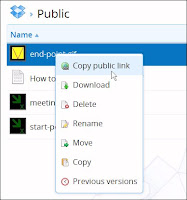 Once you've uploaded your icon file to your Public Folder in Dropbox, all you have to do is right-click on the filename, and select Copy Public Link (see screen shot). The file's URL will appear in a pop-up box, from where you can copy it to the clipboard. If you prefer a shorter - but more cryptic - version of the URL, click on "Shorten link".
You can then go ahead and paste the link into the Placemark Editor, as I described in the article.
There's one other update to the article. When I first wrote it, custom icons didn't show up properly in printed versions of a My Places map. Google has now fixed this problem. Now, when you print your map, all the icons will appear as expected.
In my tutorial on adding custom icons to My Places in Google Maps, I mentioned that you can't use Dropbox to host your icons. That's because it requires a log-in. Hex Central reader Jamie Barber wrote to say that you can indeed use Dropbox for this purpose, provided you place the relevant files in your Public Folder. I have amended the article accordingly.
 Once you've uploaded your icon file to your Public Folder in Dropbox, all you have to do is right-click on the filename, and select Copy Public Link (see screen shot). The file's URL will appear in a pop-up box, from where you can copy it to the clipboard. If you prefer a shorter - but more cryptic - version of the URL, click on "Shorten link".
You can then go ahead and paste the link into the Placemark Editor, as I described in the article.
There's one other update to the article. When I first wrote it, custom icons didn't show up properly in printed versions of a My Places map. Google has now fixed this problem. Now, when you print your map, all the icons will appear as expected.
October 9, 2012
French IGN 1:25,000 now available for Anquet Maps
By Mike Lewis
 In my article on transferring data from Anquet Maps to Google Maps, I mentioned that Anquet only supplies maps for the UK. The company had told me that mapping would be available soon for other countries, but they didn't put a date on that.
I'm happy to report that Anquet have now introduced a set of 1:25,000 topographical maps covering the whole of France (including Corsica). This is the highly-regarded Série Bleue of the Institut Géographique National (IGN). If you've ever used any of these maps, you'll know what superb quality they are. Like their British OS Explorer equivalents, they show a vast amount of detail, and are an excellent resource for hill-walking, cycling and most other outdoor activities.
And, of course, it's possible to use Anquet software to plot a route on these maps, then transfer it to Google's My Places, in the way I described in my article. More information about Anquet's products can be found on the company's website.
 In my article on transferring data from Anquet Maps to Google Maps, I mentioned that Anquet only supplies maps for the UK. The company had told me that mapping would be available soon for other countries, but they didn't put a date on that.
I'm happy to report that Anquet have now introduced a set of 1:25,000 topographical maps covering the whole of France (including Corsica). This is the highly-regarded Série Bleue of the Institut Géographique National (IGN). If you've ever used any of these maps, you'll know what superb quality they are. Like their British OS Explorer equivalents, they show a vast amount of detail, and are an excellent resource for hill-walking, cycling and most other outdoor activities.
And, of course, it's possible to use Anquet software to plot a route on these maps, then transfer it to Google's My Places, in the way I described in my article. More information about Anquet's products can be found on the company's website.
Subscribe to:
Posts (Atom)